Newsletter 2 (en): New FES-Intranet


Content

Here you can find out:

  • How the new intranet is changing our communication
  • What it looks like "from the inside"
  • What the next steps are
  • And how to proceed with the choice of name
 

Your intranet is (almost) there! For you! New ways for internal communication


The new intranet will change our internal collaboration and knowledge management. It will be easier for you to get exactly the information that interests you and is relevant to your work - even beyond the boundaries of your work unit.

Information hierarchies are reduced - information is directly accessible and teamwork promoted. With your own posts and comments you can react to information and give feedback.

Personal initiative is welcome! Which topics and discussions do you find interesting? In which groups would you like to work? Which of your contents could also be interesting for others? You have a choice! You are part of a global FES network that lives from transparency and from your participation. Because - your intranet is there for you.

But don't worry: you don't have to be a technology guru to use the system. It is intuitive to learn and easy to use. The new intranet basically consists of three areas:

  1. Information. This you may know from the old-fashioned intranet(s). In the new intranet, however, you can control yourself which information is relevant for you. This helps to channel the flood of information.
     
  2. Collaboration. This offers you a variety of opportunities to work together, within your team, but also independently of location and across work units. Knowledge management becomes simpler and more comprehensive. But personal contact is also encouraged.
     
  3. Social communication. You get a fast, direct and uncomplicated way to exchange yourself with colleagues.
 

Pages, workspaces, events, chat? The core functions of the new Social Intranet


Are you already curious about what our Social Intranet looks like and how you can use it in the future?

The screenshots we show you below are all in German. We have not yet managed to create the intranet in English, French and Spanish (but it will be soon!). However, we do not want to withhold the basic information about the system from you. And since you will surely be confronted with German terms all the time - "Kursbogen", "Maßnahmenstammblatt" etc. - we trust you will be able to find your way :-)

The new intranet is based on the Coyo system. The most important areas are:

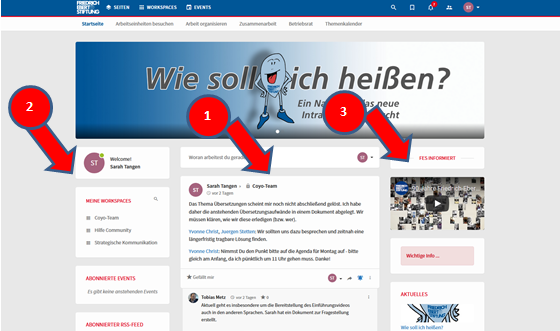
Homepage: Here you will find contributions from the fields of information (3), collaboration (1) and social communication (1). You will also get an overview of the content you have subscribed to (2). The start page gives you a personalized overview of the things you want or need to know. Everything else does not appear on your personal start page - so no FES Spam :-)

Bild: Startseite mit Info


Let's take a closer look at the individual elements:

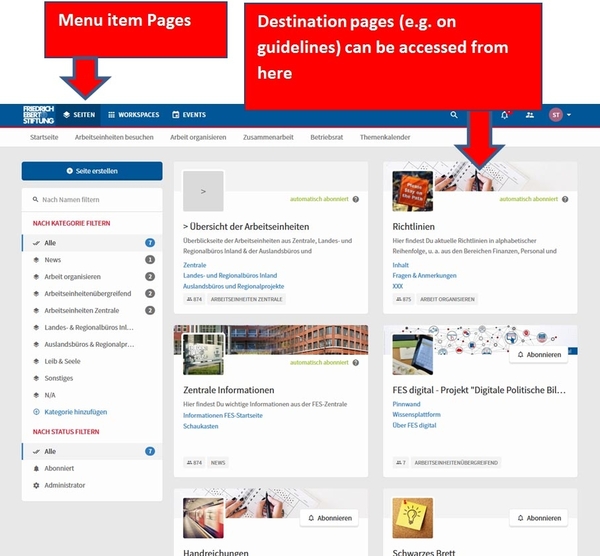
Pages are areas maintained by editors where important information for employees can be found (i.e. what you may know from the old intranet). For example, there will be pages with central information, guidelines & handouts or information on the work units. These can be accessed via the menu item Pages.

Bild: 02en


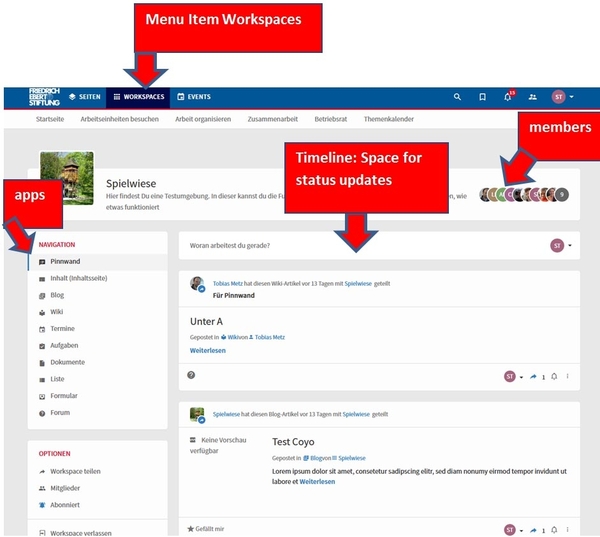
Workspaces are digital workspaces for collaboration. You can open a workspace for a project or topic or for your work unit, office or team.

Here you can exchange information with colleagues, view and edit documents, create task lists, publish blog posts and much more. The workspaces can be adapted with the Coyo apps to the needs of the working group.

There are public, semi-public and closed workspaces.

Public workspaces are visible to everyone and immediately accessible. A semi-public workspace can be found by everyone in the list of workspaces and via search, but a join request is required to access the content. As for closed workspaces, nobody can find them and see the content unless you are a member.

Because the intranet is a service of the FES, general terms and conditions apply. You will receive them before the intranet goes live from your FES resident representative.


Bild: 03en


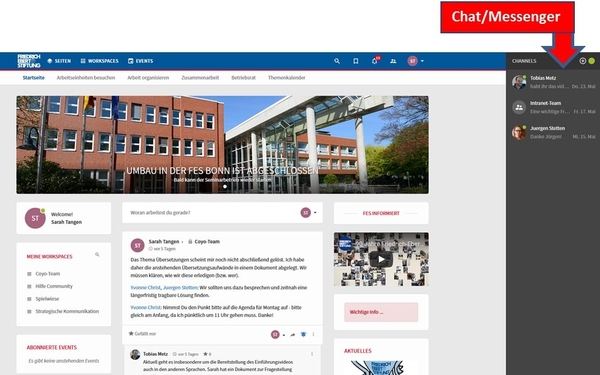
Chat/Messenger: This works similar to "Whatsapp". Here you can have conversations "in real time" with one or more colleagues which are not intended for all members of a workspace or for which you do not want to set up a workspace immediately.

Bild: 04en


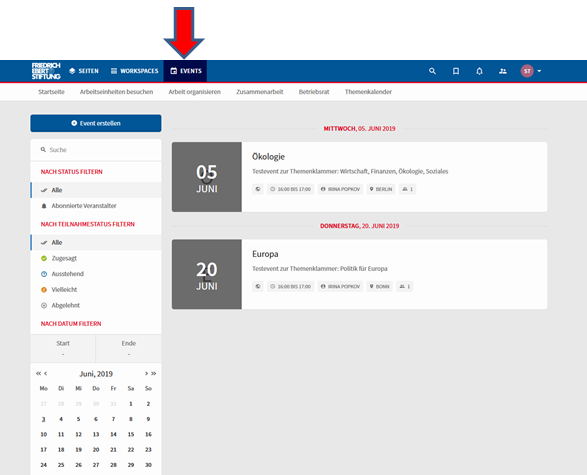
Events: In the event calendaryou can get an overview of public or subscribed events. You can also directly confirm your participation there.

Bild: Eventkalender mit Info


We want to provide more detailed information on the use of the new intranet in the form of videos. A first video is already available, unfortunately only in German at the moment. We will translate it into English, Spanish and French - but it will take some time. If you'd like to take a look at it in German, you can do it here.


Migration: How does the old intranet get into the new one?


Since we did not have a worldwide FES intranet until now, only content from the old German intranet will be migrated. When the new intranet is up and running, you can get started and create new content.

Do you still want to know how the migration process is planned? That's how it will work:

Migration assistants will support us in migrating relevant content from the old intranet to the new one.

Central information on work organization (i.e. information that is relevant for most employees, such as handouts, forms or training information) is migrated by the migration assistants.

The pages of the work units and offices will in future only contain reduced information, e.g. the organisation chart with contact information and a self-presentation. Therefore, only content that is of interest for the organization as a whole is migrated from the previous intranet. In the future, a workspace can be used for information that is relevant only to internal work units.

The schedule: The positions of migration assistants are currently advertised. Once they have been recruited, the migration can begin. Only then will we know how long the migration process will take. We'll keep you posted.


What should our intranet be called? Your ballot papers are on their way.


Bild: Fenestra 1 blau logo
 

In the last newsletter we asked for name suggestions for the new intranet. Over 100 proposals have been received. Many thanks for the active participation!

We have chosen five names from this list, which you can now vote on.

You will receive your "election documents" with further information digitally from your local FES Resident Representative.

The vote shall run until September 5, 2019.

The result will be announced in the next newsletter. We are already very curious!